
Step 1
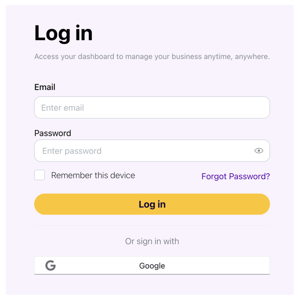
On the login page, click the “Forgot Password” link located below the Password field
Step 2
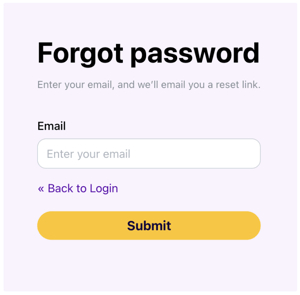
Enter the email address associated with your BizUpUSA account.
Step 3
Check your inbox for the password reset email, then click the link and follow the directions to change your password. Make sure to check your spam and junk folders if you can’t find the email.
Still having trouble?
If the steps above don’t resolve the issue, our Customer Success team is here to help. You can chat with us through Astra or email Customer Success at help@bizupusa.com.
When reaching out, please include any helpful details — such as error messages, the device you’re using, and whether you’re on a browser or mobile app — so we can get you back into your BizUpUSA account as quickly as possible.