
-
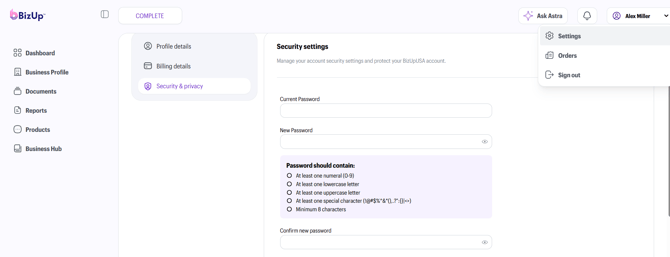
To update your password: In the upper right-hand corner, click your name then select account settings > security and privacy > change password.
-
To update your account details: Send an email to our Customer Success team or open a ticket via Astra in the bottom hand corner of your screen for all other account detail updates.
-
Verification: Please reach out from the email address currently associated with your account. If you have lost access to that email, our team will ask a few security questions to verify your identity. Once verified, our team will update your password, email, or other account information.
Your Security is Our Priority
Your data is secure with BizUpUSA. We require verification on your account to ensure that:
-
Only authorized users can make account changes. We can verify your identity before any sensitive changes are made.
-
Your data remains under your control. Even if someone gained unauthorized access to your dashboard, your account ownership isn’t compromised.
Common Questions
Why can’t I update my email address or phone number from the Dashboard? Your account information is linked to legal business documents and therefore cannot be freely edited. Our verification policy was designed to keep your account and your data safe.
How long will it take? In most cases, we can resolve account updates within a few hours during business days.
Are these the same steps I take if I forget my password? You can reset a forgotten password from the Dashboard. For more details, read this article.